This guide explains how Administrate calculates financials on an Event, including dashboard totals, setup tables, forecast behavior, and how invoiced and forecast values are derived.
Event financials are shown in the Event's company currency unless otherwise stated. For example, the Prices table displays values in the currencies they were set in.
The system determines the company by looking at the Event's Location, then its Region, then the Company associated with that Region. The Company's base currency is set on the Company setup page in the Control Panel.
Contents
- Currency and context
- Event dashboard statistics
- Event setup tables
- Price table
- Revenue table
- Costs table
- Profit
Currency and context
The currency displayed at the top right of the Event is the Company currency.
All amounts on the Event are displayed in the Company currency unless otherwise stated. For example, the Prices table displays values in their respective currencies.
The system determines the Company by looking at the Event's Location, then the Region, then the Company associated with that Region. That Company's base currency is set on the Company setup page in the Control Panel.
Event dashboard statistics
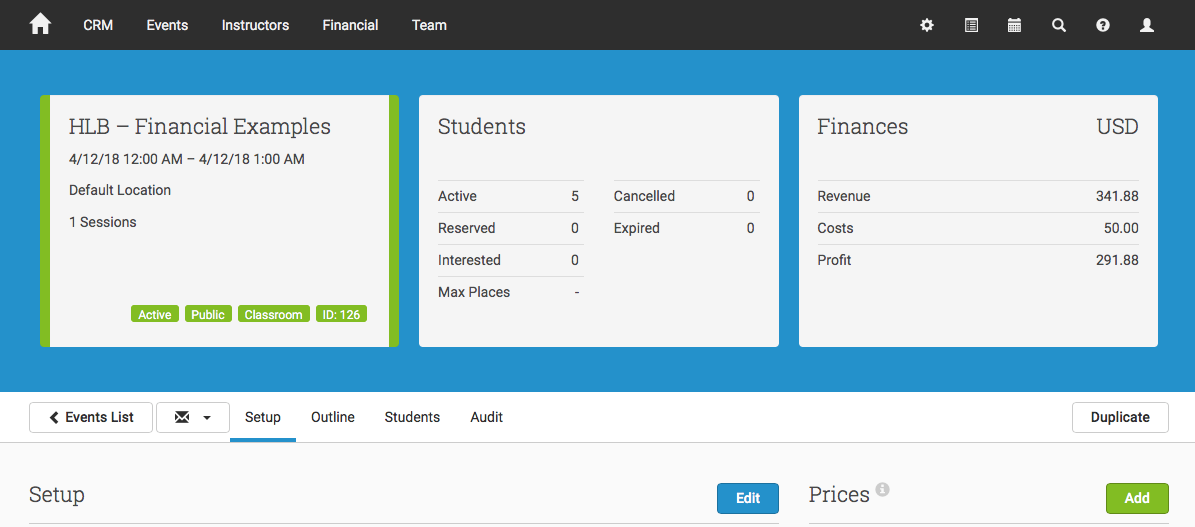
Revenue is the sum of the amounts on Invoices linked to the Event. This does not take into account whether an Invoice is marked as paid.
Costs is the sum of the amounts on Purchase Orders raised on the Event. This does not include costs where a Purchase Order has not yet been raised.
Profit is the sum of the amounts on Invoices minus the sum of the amounts on costs with raised Purchase Orders.
Event setup tables
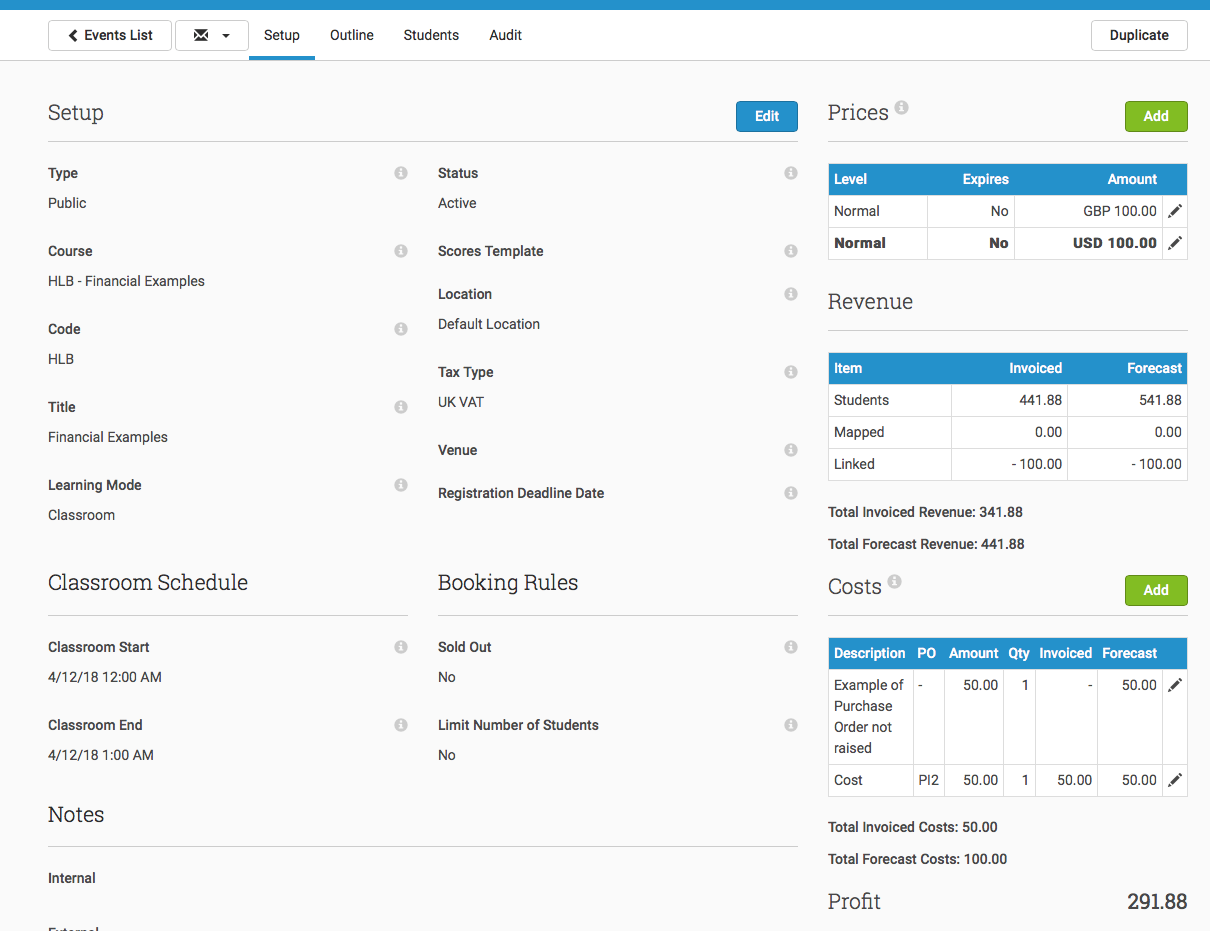
The Event setup area includes tables for prices, revenue, and costs. These tables help explain both current financial position and forecasted financial position.
Price table
Prices are the different prices available to your customers. These display alongside the currency they were set in.
Revenue table
The Revenue table shows how the Event is performing and provides a forecast for future revenue.
- Invoiced shows totals from Invoice amounts linked to the Event.
- Forecast shows estimated total future revenue, including both invoiced and not-yet-invoiced revenue.
For non-invoiced items, forecast values are estimated using the Event price. Cancelled Students who have been invoiced are still included in Revenue unless their Invoice has been deleted. Where a Credit Note has been raised, that amount is reflected in the Linked row.
| Item | Invoiced | Forecast |
| Students | This is the sum of the amounts on Invoices billed for Students. If multiple currencies are involved, these are converted at the line item level before summing. If an invoiced Student is cancelled, they are still included here to support late cancellations that still need to be charged. If you do not want this included, for example because the Student cancelled on time and should be refunded or never paid in the first place, raise a Credit Note against the Invoice to adjust the Revenue. You may alternatively delete the Invoice, but a Credit Note is preferable because you can report on lost Revenue. For multi-currency scenarios, invoiced transactions are converted using the currency conversion from the day before the Invoice tax point date. |
This is the sum of the amounts on Invoices billed for Students plus the amounts expected on not-yet-invoiced Students, calculated using Event Prices and number of Students. If multiple currencies are involved, these are converted at the line item level before summing. Cancelled Students who have not been invoiced do not appear in the Forecast. For multi-currency scenarios, invoiced transactions are converted using the most recent available currency conversion, which is most likely yesterday's. |
| Mapped | This is the sum of the amounts of Mapped Items on the Invoices. If multiple currencies are involved, these are converted at the line item level before summing. If an invoiced Student is cancelled, their Mapped Items are still included here to support late cancellations that still need to be charged. If you do not want this included, for example because the Student cancelled on time and should be refunded or never paid in the first place, raise a Credit Note against the Invoice with the Mapped Items to adjust the Revenue. You may alternatively delete the Invoice, but a Credit Note is preferable because you can report on lost Revenue. For multi-currency scenarios, invoiced transactions are converted using the currency conversion from the day before the Invoice tax point date. |
This is the sum of the amounts on Invoices billed for Mapped Items plus the amounts expected on not-yet-invoiced Items, calculated using Mapped Item prices and number of Students. If multiple currencies are involved, these are converted at the line item level before summing. For multi-currency scenarios, invoiced transactions are converted using the most recent available currency conversion, which is most likely yesterday's. |
| Linked | This is the sum of the amounts of other line items otherwise linked to the Event. If multiple currencies are involved, these are converted at the line item level before summing. For example, if you raise a Credit Note against an Invoice on the Event, that adjustment is displayed here. Xero Credit Note adjustments are not displayed here. Xero adjusts the Account balance, but it does not know which Events to allocate those adjustments to. |
This is the sum of the amounts on Invoices billed for Linked Items plus the amounts expected on not-yet-invoiced items. If multiple currencies are involved, these are converted at the line item level before summing. |
Total Invoiced Revenue is the sum of all rows in the Invoiced column of the Revenue table.
Total Forecast Revenue is the sum of all rows in the Forecast column of the Revenue table.
Costs table
| Description | PO | Amount | Qty | Invoiced | Forecast |
| [PO/COST DESCRIPTION] | If the Purchase Order has become a Purchase Invoice, the reference is displayed here. | The amount on the Purchase Order or Purchase Invoice is displayed here. | The quantity on the Purchase Order or Purchase Invoice is displayed here. | If the Purchase Order has become a Purchase Invoice, the amount is displayed here. | The expected amount of the Purchase Order or Purchase Invoice is displayed here. |
Total Invoiced Costs is the sum of all Purchase Invoiced rows in the Costs table.
Total Forecast Costs is the sum of all rows in the Forecast column of the Costs table.
Profit
Profit is the sum of Total Invoiced Revenue minus Total Invoiced Costs.